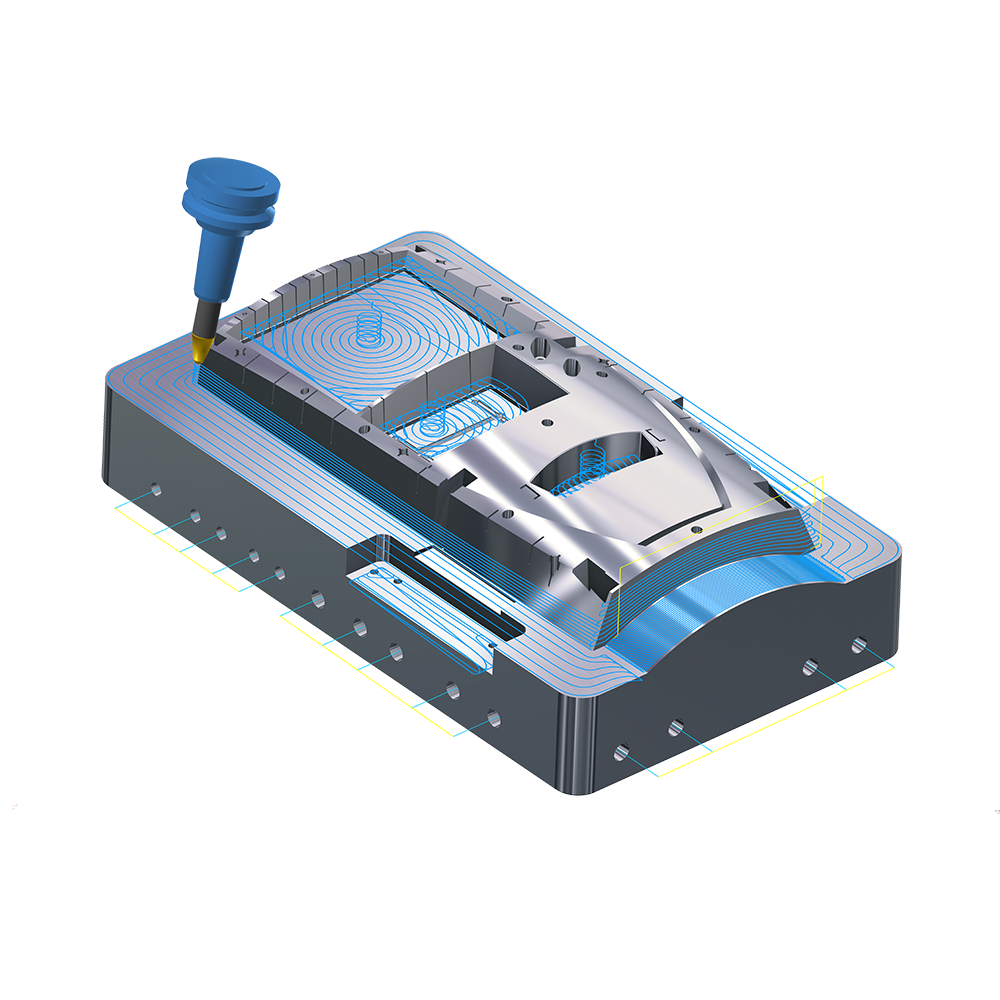
Oppdag styrken i Mastercam fresing

Trust the Leader mill

Mastercam is the most widely used CAM software worldwide* and remains the program of choice among CNC programmers. Mastercam Mill X5 is the next generation of our popular program, delivering the most comprehensive milling package with powerful new toolpaths and techniques.

The Core of Your Machining Needs

Mastercam gives your shop the best possible foundation for fast and efficient milling. From general purpose methods such as optimized pocketing to highly specialized toolpaths like 5-axis turbine cutting, Mastercam ensures that you're ready for any job.

And Mastercam Mill can grow with your business. Start with what you need, and upgrade to new machining techniques as your needs grow.

* Source: CIMdata, Inc.

A Focus on Speed and Ease of Use

Mastercam X5 is here with a new suite of CAD/CAM tools focused on delivering speed and efficiency for your machining jobs.

Dynamic Contouring

New in Mastercam X5, Dynamic Contour - based on the dynamic milling algorithm - uses an intelligent, efficient high speed contouring strategy to remove material along walls. The Dynamic Contour toolpath supports multiple passes and can optionally include finishing passes.


Streamlined Dynamic Mill Controls
video

Mastercam's popular Dynamic Mill option is refined for even easier programming.


Enhanced FBM Mill

FBM now automatically programs tapered walls, letting you either choose a specific taper tool or a step-down finish with a flat end mill.


Faster, more efficient roughing video

High speed OptiRough removes large amounts of material quickly. The tool takes an aggressive depth cut, followed by a series of quick up-cuts, then repeats the process at the next depth. The result is more even tool wear and dramatically reduced cutting time.


Hybrid Finishing video

Hybrid machining is the latest addition to the list of finishing toolpaths, addressing both steep and shallow regions of your models in a single toolpath. This powerful toolpath benefits from newly developed technology comparable to Waterline and Scallop motion.


ISCAR HEM Support

Mastercam includes specific support for ISCAR's HEM (High Efficiency Machining) tools, ensuring that parts are programmed to get the absolute most out of the cutters. Simply select the appropriate ISCAR cutting tool from the library, and the optimum information, feeds, and speeds are calculated automatically. The following toolpaths support these highly efficient tools:

  • 2D HST - Dynamic Area Mill, Dynamic Core Mill, Dynamic Rest Mill, Dynamic Contour
  • 3D HST - OptiRough

New Multiaxis Toolpaths video

Mastercam X5 introduces eight new triangular mesh toolpaths to the Multiaxis family. These new toolpaths support surface, solid and STL input. The strategies have power similar to Mastercam's 3-axis strategies, with the added flexibility of tool axis control. collision checking and linking.


Streamlined Multiaxis Interface
video

Mastercam X5 introduces a unified interface and a streamlined workflow for Multiaxis toolpaths. The selection screen tree structure will change based on toolpath family and type selections. The tree is laid out in the logical order of setting your toolpath parameters. Simply advance along the tree structure, choosing your options and setting your parameters along the way, to create the desired multiaxis toolpath.

Contouring, Drilling, and Pocketing

2D machining ranges from the very simple to the very complex. Mastercam delivers all the tools you need for precise control over all aspects of 2D machining.

Contouring

  • Choose separate lead-in and lead-out for contours and pocket finish passes.
  • Choose multiple roughing and finishing passes and multiple depth cuts for any contour.
  • Easily machine 2D and 3D contours including parametric and NURBS splines.
contour remachining
Automated contour remachining with a smaller tool

ramp contouring
Ramp contour cutting

3D contouring
3D contouring


Drilling

  • Automatically identify and pre-drill multiple operations at their plunge points.
  • Automatic drilling countersink depth calculation.
  • Optimize drill routines to minimize tool travel.
  • Automatically create bolt circles or grids of points.
  • Auto drilling creates complete cycles of drill operations on sets of holes, even with different diameters.
contour remachining
Fully automated solid model drilling

ramp contouring
Fully optimized drilling


Pocketing and More

  • Dynamic milling creates an active toolpath that delivers more consistent cutting conditions and allows use of the entire tool flute length while reducing machining time.
  • 2D high speed toolpaths deliver efficient, lower-stress motion even without a high speed machine.
  • 2D high speed Peel Milling peels away material, layer by layer. It delivers efficient constant climb milling with trochoidal type motion and accelerated back feed moves when the tool is disengaged.
  • 2D high speed Core Milling cuts from the outside in, using high speed-friendly transitions.
  • 2D high speed Area Milling is excellent for more complex shapes and uses high speed-friendly transitions.
  • 2D high speed Rest Milling evaluates all previous toolpaths and removes remaining material with high speed motion between cuts.
  • 2D high speed Blend Milling gradually morphs the toolpath between two shapes, using high speed.
  • Pocketing styles include high speed, zigzag, one way, true spiral, constant overlap spiral, and morph pocketing, each with optional finish passes.
  • Machine open pockets without creating additional geometry.
  • Choose plunge, helical, or ramp entry.
  • Special spiral pocketing options eliminate material when the tool turns a sharp corner.
  • Contour and pocket remachining use a smaller tool to automatically clean out material left from previous operations.
  • Wear compensation for contour and pocket finish passes lets you adjust for tool wear at the machine tool without creating a new toolpath.
  • Choose multiple machining areas with a single selection.
  • Click and drag a machining start point to anywhere on your model.
  • Automated slot, circle, and thread milling.
  • Choose separate taper angles for contours, pocket walls, and pocket islands, including islands of different heights.
  • Smart pocket depth control for thin-walled pockets lets you machine depths without retracting, or machine all cuts in a single area before moving to the next.

dynamic
Time-saving dynamic milling
one way zig zag
Fast zigzag and one-way pocketing
spiral pocketing
Sprial pocketing
morph pocketing
Morph pocketing cuts smoothly between two shapes
circle mill
Automated circle milling
tapered wall
Tapered-wall pocketing
open pocketing
Open pocket machining
pocket remachining
Automated pocket remachining with a smaller tool
pocket remachining
Automated pocket remachining with aa smaller tool
pocket depth
Complete your cutting pocket by pocket or by related Z-level cuts
High speed pocketing
Specialized high speed pocketing
tombstone
Easy tombstone programming

Quick part facing
island facing
Automated island facing

Feature Based Machining (FBM)

Almost every shop deals with solid models, and Mastercam delivers a powerful way to automatically mill and drill these parts. Valuable for experienced power users and easy enough for new users, FBM evaluates a part's features and automatically designs an effective machining strategy.

With just a few simple clicks, Mastercam FBM will:

FBM
Mastercam's new Feature-Based Machining makes it significantly easier to machine prismatic solids by automating the programming process.
  • Detect solid machining features for the chosen FBM operation type, based on your selection criteria.
  • Automatically cut straight-walled and tapered-wall pockets.
  • Machine pockets using 2D roughing, rest mill, and finish operations.
  • Automatically support closed, open, nested, and through pockets and set the right toolpath options.
  • Optionally create a separate finish toolpath for floors and walls.
  • Automatically identify when external machining is required and enable you to activate or deactivate it.
  • Automatically identify when facing is required.
  • Automatically create drilled, tapped, counterbore, and countersink holes.
  • Automatically perform deep drilling, spot drilling, pre-drilling, tool selection, and tool creation if needed.
  • Advanced controls to drill blind, through, co-axial, and split holes.
  • New Dynamic Plane creation streamlines and simplifies all plane creation with easy click-and-drag tools.
  • Select the appropriate tools for all operations, either from your preferred tools list or from libraries you specify.

The time savings when using Mastercam FBM are dramatic, but its power isn't just in the click-and-go ease. All toolpaths are fully associative and editable after creation. This gives you the broad flexibility to make changes at any time, and ensures that your parts will be cut exactly as you want them.

Powerful Roughing

Fast, efficient bulk material removal is essential to efficient NC programming. Mastercam gives you a variety of techniques to rough machine all of your parts.

  • Rough cut multiple surfaces, solid models, STL files, or any combination.
  • Rough cut with constant Z contours or pockets.
  • video Highspeed OptiRough removes large amounts of material quickly. The tool takes an aggressive depth cut, followed by a series of quick up-cuts, then repeats the process at the next depth.
  • Rough cut by descending parallel or radial cuts, with complete control over plunging with positive and negative Z motion.
  • Custom plunge roughing lets you rough straight from the top (with no XY motion) in any user-defined cut pattern.
  • Constant-Z rough restmill (remachining) identifies and machines areas that need to be roughed with a smaller tool.
  • Automatic facing and critical depth recognition ensures flat surfaces that lie between Z-cuts won't be left with too much stock during rough machining.
  • Automatically align all your roughing plunge points, making it easier to pre-drill those spots for production machining.

optirough
Remove bulk material faster and with even tool wear.

parallel rough
Parallel roughing


pocket roughing
Fast pocket roughing


plunge roughing
Advanced plunge roughing in any pattern

rough remachining
Automated rough remachining with a smaller tool
critical depths
Automatic roughing of critical depths

entry methods
Multiple methods for smooth, efficient part entry

Versatile Finishing

parallel radial
Highly efficient hybrid finishing
constant z
Constant Z contour finishing
finish project blend
3D project machining follows solids' and surfaces' natural curves for a consistent finish
unlimited pencil finish
Unlimited Pencil Finishing machines the entire part in logical segments

Mastercam's suite of 3D finishing tools lets you choose the best method for the results you need.

  • Finish multiple surfaces, solid models, STL files, or any combination.
  • video New hybrid finishing intelligently blends two efficient cutting techniques in a single toolpath.
  • 3D Toolpath Refinement allows unsurpassed control on surface cuts, delivering superior finishes and optimized cycle times.
  • Unlimited Pencil Finishing machines the part in logical segments.
  • Parallel finishing delivers robust toolpaths for a wide variety of projects.
  • 3D project machining creates a consistent, smooth finish while following the natural curves of multiple surfaces or solid. It even includes a quick option for faster processing where appropriate.
  • Constant scallop machining maintains a consistent finish on sloped and flat surfaces alike by using a consistent 3D stepover.
  • Radial finishing creates toolpaths radiating outward from a selected point, perfect for round parts.
  • Flowline machining cuts single or multiple surfaces using their natural shape to define the cutter path, delivering a smoother finish.
  • Ruled toolpaths include automatic synchronization by entity, branch, or node. Cutting options are Constant-Z, zigzag, circular, one way, or 5-axis swarf machining.
  • Full check surface support.
  • Cut leaving negative stock, even with flat cutters.


3D Toolpath Refinement delivers a dramatically superior finish.

Clean-up Machining

Leftover material causes extra handwork and time. Mastercam automates leftover material identification and removal, providing you with finer finishes.

stock cleanup
Remaining stock cleanup in steep (above) and shallow areas

hybrid remachining
Hybrid remachining changes strategies in a single toolpath

pencil finishing
Versatile pencil finishing for a crisp finish

  • Run cleanup cycles on multiple surfaces, solid models, STL files, or any combination.
  • Hybrid leftover machining changes the cut method as the slope of the model changes - in a single toolpath.
  • Constant-Z rest milling (remachining) identifies and machines areas that need to be cut with a smaller tool, including automatically detected critical depths.
  • Pencil tracing walks a tool along the intersection of surfaces to clean out hard-to-reach areas. You can perform single or multiple passes for precision cleanup.
  • Steep/Shallow machining cuts only those regions of selected surfaces that have slopes between two specified angles.

A Wide Range of Multiaxis Strategies

Multiaxis machining can dramatically increase a shop's competitiveness, and Mastercam's multiaxis add-in offers a wide range of multiaxis machining strategies - both basic and advanced. With Mastercam, you have complete control over the three crucial elements of multiaxis machining: toolpath types, tool motion, and tool axis. And you get that control in a clear, easy to understand way.

toolpaths
Streamlined multiaxis programming tools make projects easier than ever before. video

multiaxis gouge check
Advanced gouge checking helps ensure safe cuts in even the most complex operations.


multiaxis parameters
Mastercam's advanced multiaxis machining lets you choose what type of project you are doing and adjusts the interface to show exactly what you need.

3D contouring
Mastercam's link options offer complete control over entry/exit, cut-to-cut, and between cut moves.


Multiaxis Toolpath Types

multiaxis roughing
Efficient multiaxis roughing techniques help ensure accurate cuts and short turnaround times.
multiaxis trimming
5-axis contour cutting for easy trimming
  • Multisurface 5-axis roughing and finishing, including depth cuts, plunge roughing, and flowline machining.
  • Machine 5-axis parts using spiral, zigzag, or one way tool motion.
  • Swarf fanning and swarf machining over multisurface floors keeps the tool edge against the drive surface for a smooth finish.
  • Rail swarf cutting gives you added control by driving the tool along a lower rail.
  • 5-axis circle milling.
  • Minimum tilt control helps prevent tool motion that would cause tool holder collisions.
  • Machine 5-axis curves with independent definitions of tool side angle and lead/lag angle.
  • Create 5-axis contour toolpaths around surface edges for applications such as trimming vacuum-formed parts.
  • Machine toward a single point for smooth tip cutting around an entire part.
  • Easy 4-axis rotary axis and roll die programming, and 5-axis drilling.
  • Wrap a toolpath around a diameter with rotary axis substitution.
  • Create full 5-axis motion from a 3-axis projected toolpath.
  • Special options for machining cylinder heads and converting probe data to machinable geometry.
5-axis drilling
Fast, efficient 5-axis drilling


multisurface swarf
Multisurface swarf cutting keeps the tool against drive surfaces for a smooth finish

rail swarf
Rail swarf cutting lets you control the cut using a lower rail

multiaxis flowline
5-axis flowline can machine a pattern that follows the natural shape of the part

cutting methods
Mastercam gives you a variety of tool motion choices: one way cutting, zigzag cutting, and smooth spiral cutting

rolldie
4-axis roll die programming delivers easy programming specialized for roll dies and vertical walls on cylindrical parts

rotary 4-axis
Streamlined rotary 4-axis cutting

Tool Motion Control

  • Automatic point generator adds greater precision in difficult areas.
  • Complete control over the tool axis, lead/lag, entry/exit, and tilt simplifies even the most difficult multiaxis jobs.
  • Full entry and exit control lets you determine exactly where and how the cutter enters and leaves your part.
  • 3D tool compensation in machine controls and full tapered tool support.
  • Advanced gouge checking and a 5-axis safe zone around the part.
added cuts
Mastercam can add toolpath points to tightly curved areas for a smoother, more consistent finish


entry exit
Full entry and exit control lets you determine exactly where and how the cutter enters and leaves your part

lead lag
Mastercam gives you complete control over your lead/lag and side tilt


Tool Axis Control

  • Shank containment simplifies cutting in confined areas.
  • Powerful axis limits control tool motion between defined angles, ensuring the tool tilt will not violate part or machine tool limits.
  • Easily refine control of your tool axis with a few simple pieces of CAD geometry.
containment
Shank containment simplifies working in confined spaces


axis limits
Mastercam's axis limits controls tool motion between defined angles, ensuring the tool tilt will not violate part or machine tool limits


Faster Turnaround and Superior Finish

High Speed Machining (HSM) is a powerful cutting method that combines high feed rates with high spindle speeds, specific tools, and specific tool motion. HSM can deliver faster turnaround and a superior finish. Mastercam includes a suite of HSM functions designed to help you make the most of this powerful technique, even if you don't have a high speed machine.

horizontal milling
New Dynamic Milling creates an active toolpath that delivers more consistent cutting conditions.

horizontal milling
Automatically machine flat areas using new time-saving minimum retracts and smooth entry, exit, and cut motion.


ramping
Contour parts with smooth, consistent ramping motion.
project spiral
Projected spiral finishing delivers a smooth cut with consistent material contact.
  • High speed toolpaths for 2D and 3D machining.
  • Dynamic Milling creates an active toolpath that delivers more consistent cutting conditions and allows use of the entire tool flute length. video
  • Automatically machine flat areas using new time-saving minimum retracts and smooth entry, exit and cut motion.
  • Contour parts with smooth, consistent ramping motion.
  • High speed scallop cutting delivers a consistent finish.
  • Projected spiral finishing delivers a smooth cut with consistent material contact.
  • High speed waterline cutting delivers constant Z moves with smooth entries and exits.
  • Smooth, automated circle milling.
  • Specialized high speed pencil tracing removes material from a previous finish pass.
  • High speed area clearance removes bulk material from the inside out with smooth motion.
  • Smart core roughing cuts from the outside in. If it encounters a pocket, it automatically switches to inside out.
  • High speed rest roughing smoothly removes material left from a previous rough pass.
  • Full holder checking for high speed toolpaths, including checking under the holder.
waterline
High speed waterline cutting delivers constant Z moves with entries and exits.

circle milling
Smooth, automated circle milling.


pencil
Specialized high speed pencil tracing removes material from a previous finish pass.
area clearance
High speed area clearance removes bulk material from the inside out with smooth motion.


trochordial roughing
Smart core roughing cuts from the outside in. If it encounters a pocket, it automatically switches to inside out.


rest mill
High speed rest roughing smoothly removes material left from a previous rough pass.

Dependable Toolpath Verification

verification

Mastercam gives you the confidence to run even the most complex cutter paths on your machines. You can easily check that the motion delivers exactly what you want with Mastercam' s toolpath verification tools.

  • Watch and measure your part as it is cut from a solid block of material with Mastercam's solid model toolpath verification. The tool and holder are checked and displayed during simulation.
  • video Simulate a machine's motion as it cuts your part. Turn portions of your machine on or off for easier viewing, and zoom in and rotate the part while the operation is in process for closer inspection.
  • Play the program with toolpath backplotting and get an estimate of machining time. Dynamically view all the vital information about tools and operations at any point, and even isolate specific areas to watch more closely.
  • Quickly verify 2D toolpaths with a pixel paint of the full tool diameter to check the finish.

machsim