
Oppdag styrken i Mastercam trebearbeiding
* Source: CIMdata, Inc
Whatever you can imagine, Mastercam makes it faster, easier, more efficiently.
Mastercam Router is the
CAD/CAM software that takes you to a new level of productivity.
Easy to learn because Mastercam makes programming so simple, you'll
be designing and cutting parts on day one. Easy to operate because
you can modify any part immediately - and get updated toolpaths
without starting over. Easy to profit with because Mastercam grows
with your business. From basic flat parts to the most intricate
5-axis machining, Mastercam brings unprecedented automation, ease
and expandability to your business.
With Mastercam, you get proven reliability.
Mastercam has a proven track record of developing CAD/CAM software with one thing in mind - the specific needs of the user. Today, more shops rely on Mastercam than any other CAD/CAM software. And with Mastercam Router, you have powerful, easy-to-use package with CAD/CAM tools designed expressly for router operations like yours.
What Mastercam Router Delivers:
Powerful Part Modeling
Mastercam new, streamlined CAD engine makes design work easier than ever before. Each piece of geometry you create is "live", letting you quickly modify it until it's exactly what you want. And with traditional functions consolidated into a few simple clicks, Mastercam simplifies the creation of even the most complex parts.
- Easy 2D and 3D geometry creation.
- Fast creation of 3D surfaces.
- Optional ability to create, import and machine solid models.
- Mastercam's Raster to Vector translator lets you bring in scanned art as a machine-ready CAD file.
- EPS and DWG converters included.
- Mastercam's door geometry creator helps you create various classic door designs.
- Associative dimensions update as you change your model.
- Links to KCDW, XPCNC, KAB-NX and more.
- Automatic processing of layered CAD files (DXF, DWG, MCX and more).
- Built-in data translators for IGES, Parasolid®, SAT (ACIS solids), AutoCAD® (DXF, DWG, and Inventor TM files), SolidWorks®, Solid Edge®, STEP, EPS, CADL, STL, VDA, and ASCII. Direct translators for CATIA®, Pro/E®, and more are also available.
Everything at Your Fingertips
- Mastercam's Operations Manager stores all your job's components in one place. Quickly create, edit and verify your toolpaths, or copy and paste parameters, toolpaths and tool definitions from one operation to another. You can even modify your solids from the Operations Manager.
Define Your Shop
• Mastercam delivers a new way to make sure that your parts are done right the first time - Machine and Control Definition. Define features and characteristics for all the machines in your shop to simplify programming and streamline machine changes.
Associative Toolpaths 
- Fully associative geometry and toolpaths let you modify the geometry or machining parameters and immediately get an accurate, updated toolpath.
- Store a library of commonly used operations to automate machining. For example, you can spot drill, peck drill, and tap a series of holes simply by importing one stored operation.
Pocketing, Contouring and Drilling
2D machining ranges from the very simple to the very complex. Mastercam delivers all the tools you need to maximize your time.
- 2D contouring for flat shapes.
- 3D contouring for complex shapes and trimming.
- Block drill and aggregate support.
- Pocketing styles include true spiral, constant overlap spiral, 'morph' pocketing, zigzag and more.
- Choose multiple drill points, contours, pockets, and nested
pockets with a single selection.
Versatile 3D Roughing and Finishing 
Fast, efficient bulk material removal is essential to efficient NC programming. A superior finish is crucial to any job. Mastercam gives you a variety of techniques suited to your specific projects.
- Rough and finish multiple surfaces, solid models, or a combination of both.
- Select from a variety of roughing and finishing styles - each designed to provide the most efficient cutting method for a specific type of part or situation.
- Leftover material causes extra handwork and time. Mastercam
automates leftover material removal, leaving you with a finer
finish.
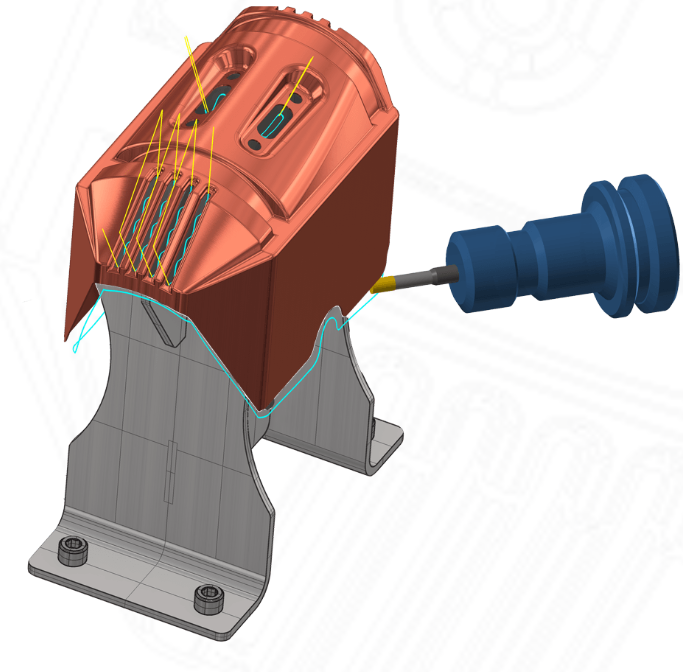
Multiaxis Machining
Multiaxis machining adds an extra level of flexibility to your machining operations for a wide variety of projects ranging from high precision to free-flowing artistic cutting.
- Create 5-axis cuts on or around curves and edge curves for applications such as part trimming.
- 5-axis drilling lets you approach the part from any angle.
- 4-axis machining.
- Swarf machine over multisurface floors.
Dependable Toolpath Verification
Watch your part being cut from a solid block of material with Mastercam's solid model toolpath verification. The tool and holder are checked and displayed during simulation.
Tabs, Webs, and Breakthrough Control
Efficient flat panel cutting relies on easy control over tabs, webs and cutting specifics. Mastercam gives you the tools to ensure you cut, and leave, exactly what you want.
- Leave a 'web' of user-definable thickness at the bottom of each cutting, holding the parts securely until you are ready to remove them.
- Complete tab control including Full Tabs (leaving the entire material thickness) and Partial Tabs with user-definable thickness.
Nesting
- High yields can be crucial to a job's profitability. Mastercam includes essential nesting capabilities.
- Fast, efficient rectangular part nesting.
- Complete control over part-to-part distance, sheet margins, and more.
- Directly place CAD models from a variety of sources.
Advanced Nesting and Engraving -- two powerful options to help get the most from your machines
Advanced Nesting 
Mastercam Router includes basic nesting, but there are times when you want more sophisticated nesting for a higher yield. Mastercam's optional TrueShape nesting optimizes your material use for greatest yields and an improved bottom line. With the TrueShape nesting add-on, you can efficiently nest interlocking parts with a variety of options.
- Advanced automatic interlocking nesting.
- Custom sheet definition.
- Maintain grain direction of any part.
- "Filler" part nesting to reduce waste.
- Mark a series of parts as a "Group" to ensure the entire set is always nested.
- Set minimum number of parts needed.
- Create and save a library of fully definable sheets.
- Save sheet scrap for later use.
- Full control over part spacing and sheet margins.
- Directly import and place DXF files.
- Automatically separate different parts into levels that you can turn on or off.
- Mastercam's fast, easy machining will program your entire
nested sheet at one time.
Engraving 
Mastercam's optional Engraving gives you the effect of classic hand-carved art using your CNC machine. Sharp inside corners give the finished piece a crisp edge which is unattainable with conventional machining. Mastercam's Engraving add-on gives you a wide variety of choices:
- Standard "chiseling".
- Embossed images.
- Open pixel-based artwork as engravable geometry (.BMP, .GIF, .TIF, .PCX, .EPS, and more).
- Easily engrave any TrueType font.
- Inverse embossing for mold work.
- Use V-groove cutters with any angle.
- Engrave remachining allows you to cut an area with a large tool and automatically remove remaining material with a smaller tool.
- Use constant-volume depth cuts for more consistent tool load.
Software That Grows With Your Business
Mastercam Router is designed to grow with your business. The
software is available in three levels, with several options, so you
can pick the one that best suits your needs. And with Mastercam,
your investment is secure - when you want to move to the next level
of Router, you simply pay the difference between the two
packages.
|
Mastercam X
|
Router Entry |
Router
|
Router Plus
|
Router Pro
|
|
CAD
|
|
|
|
|
| Complete customizability |
|
|
|
|
| Create and dimension live wireframe geometry |
|
|
|
|
| Read / write IGES, DXF, SAT, Parasolid, EPS & more |
|
|
|
|
| Read native Autocad, SolidWorks, Solid Edge & more |
|
|
|
|
| Read native Catia nd Pro/E files |
|
optional
|
optional
|
optional
|
| Live surface modeling |
|
|
|
|
| Solid modeling |
|
optional
|
optional
|
optional
|
| CAM |
|
|
|
|
| Fully associative toolpaths |
|
|
|
|
| Drilling |
|
|
|
|
| 2D contour cutting |
|
|
|
|
| Basic pocketing |
|
|
|
|
| 3D contour cutting, trimming & remachining |
|
|
|
|
| Advanced pocketing, including open pockets |
|
|
|
|
| Block drilling |
|
|
|
|
| Tabs |
|
|
|
|
| Right-angle head support |
|
|
|
|
| On-screen toolpath verification |
|
|
|
|
| Single and limited multi-surface roughing |
|
|
|
|
| Single and limited multi-surface finishing |
|
|
|
|
| Full multi-surface and solid roughing |
|
|
|
|
| Full multi-surface and solid finishing |
|
|
|
|
| Full multi-surface and solid "cleanup" machining |
|
|
|
|
| Full multi-surface and solid high-speed machining |
|
|
|
|
| 5-axis drilling and curve machining |
|
optional
|
optional
|
optional
|
| Full 4-and 5-axis machining |
|
|
|
optional
|
| Engraving |
|
optional
|
optional
|
optional
|
System Requirements
- 1.5 GHz Intel processor
- Windows® XP or Windows Vista with latest service packs and updates; .NET 2.0 framework.
- 1 Gb RAM, 1,7 GB available hard disk space
- 128 MB OpenGL-compatible (minimum)
- 1024 x 768 resolution (minimum)
- Windows® compatible mouse

